Saturday, September 24, 2011

// // Leave a Comment

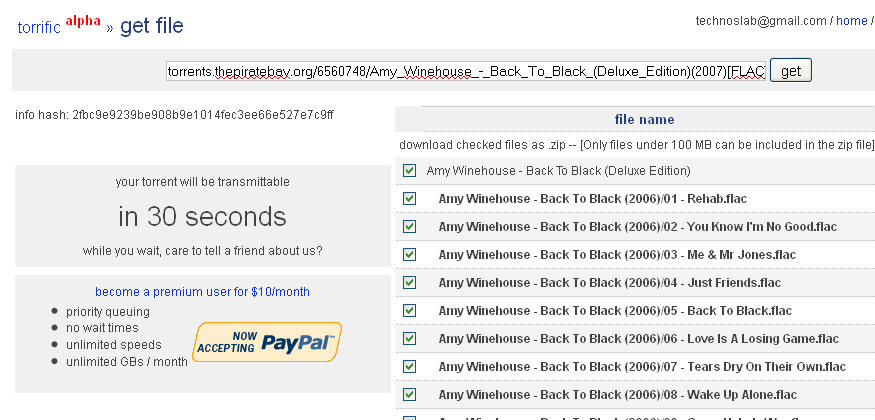
Bypass torrific.com download timer


Torrific.com is a great tool for fetching torrents and downloading them over http through our favorite download manager. From last week, they have imposed a timer on download page that limits us from downloading a fetched torrent instantly. Now we can either pay them to gain premium access to their services or we can find a work around. While I suggest you to go for premium membership, I also give you a work around.

On the page where you are asked to wait for the download to begin, just put this in the browser's address bar and hit enter.

javascript:alert(DELAY_TIME=0);

and you would get the download link(s) immediately. Please note that Google chrome doesn't support javascript execution in address bar so it would not work for chrome users. 
Source: TechnosLab
Read More
// // Leave a Comment

How to Change The Default SSH Port.

To force or change the default SSH to run on a non standard port, use the following steps: 

1. Open /etc/ssh/sshd_config in your favorite text editor:


2. Look for the below lines: 


# Port 22

3. Uncomment and edit this line to change the default port.
For example you can set it to:


Port 99

4. Save the file, and restart the SSH.


/etc/init.d/ssh restart

NOTE: Removing the # will uncomment and you will need to remove this for any change in the port.
Read More
// // Leave a Comment

How to force remove a dead node from solusvm.

This command will help you in removing a dead node from solusvm master. Since the node is dead therefore we cannot remove it using the available option in the master.
Login to SSH in the master server and run below command.


php /usr/local/solusvm/scripts/deletenode.php --level=force --comm=delete --id=

The node id can be found in the VPS Control Panel. Click on node list and note down the ID of the node you want to remove.

Example: Suppose you want to remove a node having ID = 5

Then the command will be like:

php /usr/local/solusvm/scripts/deletenode.php --level=force --comm=delete --id=5

Similarly you can force remove any node from the solusVM master. This will only remove the NODE from master and will not remove any physical VPS inside that node.
Read More
// // Leave a Comment

How to change a forgotten MySQL root password from SSH.

To change the MySQL root password, run the below commands as root:
/etc/init.d/mysql stop
killall -9 mysql 
/etc/init.d/mysql --skip-grant-tables --user=root start

Connect to mysql with the following command:
mysql -u root

Execute the below command in the mysql client: 
UPDATE mysql.user SET Password=PASSWORD('newpwd') WHERE User='root';

The 'newpwd' will be the new password for the MySQL.
Read More
// // Leave a Comment

What does serial, refresh, retry, expire, minimum and TTL mean?

Details of SOA parameters used in DNS records:

Serial — The zone serial number, incremented when the zone file is modified, so the slave and secondary name servers know when the zone has been changed and should be reloaded. 

Refresh — This is the number of seconds between update requests from secondary and slave name servers. 

Retry — This is the number of seconds the secondary or slave will wait before retrying when the last attempt has failed. 

Expire — This is the number of seconds a master or slave will wait before considering the data stale if it cannot reach the primary name server. 

Minimum — Previously used to determine the minimum TTL, this is used for negative caching. This is the default TTL if the domain does not specify a TTL.

TTL (time to live) - The number of seconds a domain name is cached locally before expiration and return to authoritative nameservers for updated information.

source: http://knowledgelayer.softlayer.com
Read More

Friday, September 23, 2011

// // Leave a Comment

Speed Up Your Javascript Load Time

Javascript is becoming increasingly popular on websites, from loading dynamic data via AJAX to adding special effects to your page.

Unfortunately, these features come at a price: you must often rely on heavy Javascript libraries that can add dozens or even hundreds of kilobytes to your page.

Users hate waiting, so here are a few techniques you can use to trim down your sites.


Find The Flab

Like any optimization technique, it helps to measure and figure out what parts are taking the longest. You might find that your images and HTML outweigh your scripts. Here’s a few ways to investigate:

1. The Firefox web-developer toolbar lets you see a breakdown of file sizes for a page (Right Click > Web Developer > Information > View Document Size). Look at the breakdown and see what is eating the majority if your bandwidth, and which files:


2. The Firebug Plugin also shows a breakdown of files – just go to the “Net” tab. You can also filter by file type:

3. OctaGate SiteTimer gives a clean, online chart of how long each file takes to download:


Disgusted by the bloat? Decided your javascript needs to go? Let’s do it.


Compress Your Javascript

First, you can try to make the javascript file smaller itself. There are lots of utilities to “crunch” your files by removing whitespace and comments.

You can do this, but these tools can be finnicky and may make unwanted changes if your code isn’t formatted properly. Here’s what you can do:

1. Run JSLint (online or downloadable version) to analyze your code and make sure it is well-formatted.

2. Use Rhino to compress your javascript. There are some online packers, but Rhino actually analyzes your source code so it has a low chance of changing it as it compresses, and it is scriptable.

Install Rhino (it requires Java), then run it from the command-line:
java -jar custom_rhino.jar -c myfile.js > myfile.js.packed 2>&1

This compresses myfile.js and spits it out into myfile.js.packed. Rhino will remove spaces, comments and shorten variable names where appropriate. The “2>&1″ part means “redirect standard error to the same location as the output”, so you’ll see any error messages inside the packed file itself (cool, eh? Learn more here.).

Using Rhino, I pack the original javascript and deploy the packed version to my website.

Debugging Compressed Javascript

Debugging compressed Javascript can be really difficult because the variables are renamed. I suggest creating a “debug” version of your page that references the original files. Once you test it and get the page working, pack it, test the packed version, and then deploy.

If you have a unit testing framework like jsunit, it shouldn’t be hard to test the packed version.


Eliminating Tedium

Because typing these commands over and over can be tedious, you’ll probably want to create a script to run the packing commands. This .bat file will compress every .js file and create .js.packed:
compress_js.bat:
for /F %%F in ('dir /b *.js') do java -jar custom_rhino.jar -c %%F > %%F.packed 2>&1
Read More
// // Leave a Comment

How To Optimize Your Site With GZIP Compression

Compression is a simple, effective way to save bandwidth and speed up your site. I hesitated when recommending gzip compression when speeding up your javascript because of problems in older browsers.

But it's the 21st century. Most of my traffic comes from modern browsers, and quite frankly, most of my users are fairly tech-savvy. I don't want to slow everyone else down because somebody is chugging along on IE 4.0 on Windows 95. Google and Yahoo use gzip compression. A modern browser is needed to enjoy modern web content and modern web speed -- so gzip encoding it is. Here's how to set it up.


Setting up the server

The "good news" is that we can't control the browser. It either sends the Accept-encoding: gzip, deflate header or it doesn't.

Our job is to configure the server so it returns zipped content if the browser can handle it, saving bandwidth for everyone (and giving us a happy user).

For IIS, enable compression in the settings.

In Apache, enabling output compression is fairly straightforward. Add the following to your .htaccess file:
# compress text, html, javascript, css, xml:
AddOutputFilterByType DEFLATE text/plain
AddOutputFilterByType DEFLATE text/html
AddOutputFilterByType DEFLATE text/xml
AddOutputFilterByType DEFLATE text/css
AddOutputFilterByType DEFLATE application/xml
AddOutputFilterByType DEFLATE application/xhtml+xml
AddOutputFilterByType DEFLATE application/rss+xml
AddOutputFilterByType DEFLATE application/javascript
AddOutputFilterByType DEFLATE application/x-javascript

# Or, compress certain file types by extension:

SetOutputFilter DEFLATE


Apache actually has two compression options:

mod_deflate is easier to set up and is standard.
mod_gzip seems more powerful: you can pre-compress content.

Deflate is quick and works, so I use it; use mod_gzip if that floats your boat. In either case, Apache checks if the browser sent the "Accept-encoding" header and returns the compressed or regular version of the file. However, some older browsers may have trouble (more below) and there are special directives you can add to correct this.

If you can't change your .htaccess file, you can use PHP to return compressed content. Give your HTML file a .php extension and add this code to the top:

In PHP:


We check the "Accept-encoding" header and return a gzipped version of the file (otherwise the regular version). This is almost like building your own webserver (what fun!). But really, try to use Apache to compress your output if you can help it. You don't want to monkey with your files.

Verify Your Compression

Once you've configured your server, check to make sure you're actually serving up compressed content.

View the headers: Use Live HTTP Headers to examine the response. Look for a line that says "Content-encoding: gzip".


Caveats

As exciting as it may appear, HTTP Compression isn't all fun and games. Here's what to watch out for:

Older browsers: Yes, some browsers still may have trouble with compressed content (they say they can accept it, but really they can't). If your site absolutely must work with Netscape 1.0 on Windows 95, you may not want to use HTTP Compression. Apache mod_deflate has some rules to avoid compression for older browsers.
Already-compressed content: Most images, music and videos are already compressed. Don't waste time compressing them again. In fact, you probably only need to compress the "big 3" (HTML, CSS and Javascript).
CPU-load: Compressing content on-the-fly uses CPU time and saves bandwidth. Usually this is a great tradeoff given the speed of compression. There are ways to pre-compress static content and send over the compressed versions. This requires more configuration; even if it's not possible, compressing output may still be a net win. Using CPU cycles for a faster user experience is well worth it, given the short attention spans on the web.

Enabling compression is one of the fastest ways to improve your site's performance. Go forth, set it up, and let your users enjoy the benefits.
Read More

Thursday, September 22, 2011

// // Leave a Comment

All about facebook passwords

So far, you must have been thinking that just like other websites, you have a single password on facebook. Well it's quite shocking to know that you actually have three facebook passwords and not just one. In fact everybody on facebook has three passwords that they can use to log in. Surprised ? So was I but you need not worry.

The passwords are not a security issue or a bug. Developers at facebook have intentionally done so to make our lives easier. Let me make it clearer through an example. Assume that your facebook password is abCDef, then other two valid passwords for your account are Abcdef and ABcdEF. The explanation for three passwords is quite simple.

abCDef is your actual password.
Abcdef is your password in capitalized format. ( Useful for logging from a mobile device ).
ABcdEF is your password with it's case reversed. ( Useful for logging with Caps Lock on ).

See how much facebook developers care for us ? If you haven't already tried this, try logging in with the other two passwords and share your experiences.

Source: TechnosLab
Read More
// // Leave a Comment

Google+ Social Networking Website – Plus.google.com Login


The leading search engine and generalised name as a father of internet has came in booming market of social networking along with its never stopping and unmatchable service as Google Plus, which is also writes as Google+ or G+. Official URL is www.plus.google.com. It’s just going to be proved as new Social Networking Site from Google. This deafening provision of social networking by Google has almost made community to wait for their sweet grapes like taste of services. This phenomenon will make the people nigh mostly which would make the world smaller.

Google Plus LogoFull spices features are made integrated to make feeling of great sociality which will make this one of the best social network. Cool features are concerned, the wall for the posting of messages purpose is provided with Google Plus along with users can change their status and comment on others’ too. Term is also embedded that makes users to add their friends in private hangout circle.

Users would be able to make dissimilar types of circles for family, friends, colleagues etc. Feature is crafted with the facility that enables all of the members to chat with buddies who are present in their Gmail account. Furthermore people can upload their or particular photos, focusing videos, events etc. Will Google+ overtake Facebook, Twitter or other social site is more important question for all experts.

Among more similar featuring services, Google Plus is embedded with some coolest features such as inbuilt Picasa. Now you can upload unlimited photos in Picasa album. Users are made with ability to import their respective contacts from Yahoo and Hotmail but not from Facebook. Parting from this side, the improvement in the serving ability is increased herein with the intention to do all the things right with Gmail, Reader, Docs, or Calendar, here profile user can get best privacy setting.

Google Plus Login Steps

#1. Open page: www.plus.google.com and hit ‘Sign in’ button
#2. Now write Email and password
#3. Have you faced any problems, visit ‘Can’t access your account?’
#4. Select blue coloured ‘Sing in button’
[If you want to create new account, visit Google.com/accounts/NewAccount page]

Google Plus Login

Video chat with a group, huddle, get the news not a feed, make circles secret, what strangers are saying and make a best relation with stranger – all these best features that user can’t get from Facebook. Google Plus project team still improved their best ability.

Facilities
Circles: create round circles that you want with interested friends, relationships, family, etc. Circles will show only those person profiles that you add to do video chat
Stream: latest updates, gossip and information from various added people profile circles. The personalised backing to any post or comment liked is to be mentioned by the +1 criterion
Photos: Tagging and uploading is made like presented never before on G+, making this facility as concrete good looking. Along with the integration of Picasa, service enables members to tag anyone’s picture
Sparks: The provision of Sparks is same as its name implies. It has been crafted just like to be display tape which would be generated automatically based on user request.
Read More
// // Leave a Comment

Google plus is now open to public

After being tested immensely for 90 days, google plus is now ready to make it's transition form an invite only to a public beta. Yes, google plus is now open to all. In a yet another feature update post on official the blog, Vic Gundotra from Google expressed how happy they are to introduce Google plus's 100th feature: open signups. The post also includes updates regarding pre-existing features like hangouts bringing it to the screens of your phones, though only for android 2.3+ devices with a front facing camera, whereas support for iOS devices is expecated soon. It's certainly good to see how hard they are working to make Google plus stand out and heavily transform our online social activities.
Read More